LoginGuards CLI — The Fastest Way to Check Password Breaches
Cross-platform binaries for Windows, Linux, macOS (Intel), and macOS (ARM64). Verify password exposures, inspect usage logs, and manage plans directly from your terminal with a secure, zero-dependency tool.
Instant breach lookup
Check passwords or hashes securely against 26+ billion leaked credentials without leaving your terminal.
Cross-platform binaries
Ship-ready builds for Windows, Linux, and macOS (Intel and Apple Silicon) with zero external dependencies.
Automation friendly
Perfect for CI/CD, DevOps scripts, or local audits thanks to JSON responses and simple command flags.
Privacy-first security
All lookups are hashed, HTTPS-secured, and never expose the raw password outside your environment.
Key Benefits
Lightweight binaries, strong privacy guarantees, and automation-ready workflows for any security team.
- Instant breach lookup — hashed & HTTPS-secured queries backed by 26+ billion credentials.
- Cross-platform support with single static binaries for every major OS.
- Privacy-first design that keeps secrets local while authenticating via x-api-key.
- Quota awareness with built-in rate-limit status checks.
- Automation ready — perfect companion for CI/CD pipelines and password audit scripts.
Main Commands
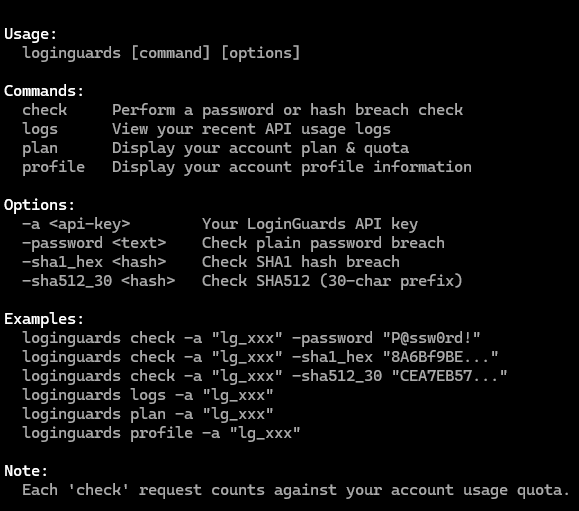
Use -a or --api-key to authenticate. Responses are JSON, ideal for piping into tools like jq.
Breach Check
Perform a live breach lookup using your API key.
loginguards check -a "<api-key>" -password "<password>"loginguards check -a "<api-key>" -sha1_hex "<hash>"loginguards check -a "<api-key>" -sha512_30 "<hash>"View API Logs
Display your recent API usage including timestamps, endpoints, and status codes.
loginguards logs -a "<api-key>"Account Insights
Inspect your active plan, quotas, and linked account profile.
loginguards plan -a "<api-key>"loginguards profile -a "<api-key>"Usage Notes
Every request is sent to https://api.loginguards.com/v1 with secure headers and hashing.
- Authenticate with -a or --api-key. The CLI sets the x-api-key header automatically.
- All requests are HTTPS + hashed — plain passwords never leave your machine.
- JSON responses make it simple to parse results in shell scripts and automation.
- Ideal for CI/CD workflows, DevOps scripts, or local password audit tooling.
Example
Single command breach lookup and sample JSON response.
loginguards check -a "lg_f7QP0dJ8rMx1Vs3G4kWnZy6Bt" -password "P@ssw0rd!"{
"found": true,
"sources": 28,
"last_seen": "2025-09-03T22:10:00Z"
}Download Options
Grab the platform-specific binary or download the entire bundle as a ZIP package.
LoginGuards CLI — built for developers, powered by breach intelligence.
Protect your users. Check smarter. ⚔️